Create Perfect Passport Photos in Seconds
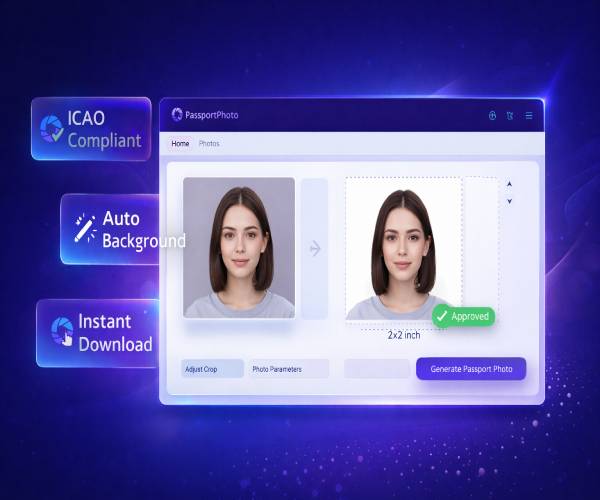
Create compliant passport, visa, and ID photos with precise manual cropping tools. 100% free for basic use.
Passport Photo Requirements by Country
Select your country for specific size requirements and instant photo processing
United States
2x2 inch • White background
Get US Photo →India
35x45 mm • White background
Get India Photo →United Kingdom
35x45 mm • Cream background
Get UK Photo →Canada
50x70 mm • White background
Get Canada Photo →Australia
35x45 mm • White background
Get Australia Photo →Germany
35x45 mm • Neutral background
Get Germany Photo →Simple 3-Step Process
Create compliant passport photos with our easy-to-use manual cropping tools
1. Upload Photo
Take a selfie or upload any photo. Our tool accepts all common formats.
2. Manual Cropping
Use our precise cropping guides to position your photo perfectly according to official requirements.
3. Download & Print
Get high-res photo instantly. Ready for print or digital use.
Professional Passport Photo Generator Online – Manual Cropping & 100% Compliant
How Our Passport Photo Generator Works
Our advanced passport photo generator provides precise manual cropping tools to create perfectly compliant passport, visa, and ID photos in seconds. Simply upload your photo, select your country, and use our guided cropping interface to position your face correctly. The tool shows you exactly where to place the crop for official requirements. Whether you need a US passport photo, UK visa photo, or Indian passport picture, our tool ensures 100% accuracy and compliance with international standards.
Perfect Passport Photo Size Accuracy Every Time
One of the biggest challenges when creating passport photos is getting the size right. Different countries have different requirements – from 2x2 inches for US passports to 35x45mm for Schengen visas. Our passport photo generator provides visual guides and templates that help you crop to the exact dimensions based on your selected country. No more guesswork, no more rejected photos at the application center. Our tool ensures your photo meets all official requirements including head size, position, and background color.
Precise Manual Cropping Tools
Our sophisticated cropping interface provides visual guides that help you precisely position your photo to meet government specifications. The system shows you the correct head height range, proper spacing around your head, and correct eye position. You simply adjust the crop box to match the guides. This gives you complete control while ensuring compliance with all official requirements. No complicated photo editing software needed.
Instant Download in High Resolution
Once your passport photo is cropped, you can instantly download it in high-resolution JPEG format suitable for both online applications and physical printing. Our photos meet all DPI requirements (300-600 DPI) ensuring clear, sharp images when printed at home or at a pharmacy. We provide both digital copies for online applications and print-ready versions with guidelines for proper printing at home.
Free vs Premium Options
We believe everyone should have access to compliant passport photos. That's why our basic passport photo generator is completely free, allowing you to create standard passport photos for most countries. For advanced features like multiple photo formats, instant passport sheets with 4-6 photos, and background removal tools, we offer affordable premium options. Our pricing is transparent with no hidden fees – perfect for families needing multiple passport photos or frequent travelers requiring various visa photos.
High Resolution Output for Professional Results
Quality matters when it comes to passport photos. Our generator produces high-resolution images that meet or exceed government requirements. Unlike smartphone apps that compress and blur your photos, we maintain original quality while ensuring compliance. The result is a professional-looking passport photo that won't be rejected due to poor quality, incorrect lighting, or pixelation issues.
Privacy and Security – Your Photos Are Safe
We understand that passport photos contain sensitive biometric data. Our platform processes all images locally in your browser – photos are never uploaded to our servers. This means your privacy is protected, and your personal images remain on your device. For premium features requiring additional processing, we use secure, encrypted connections and automatically delete all uploaded files within 24 hours. We never share, sell, or misuse your data.
Everything You Need to Know
Get answers to common questions about passport photos
Passport photo sizes vary by country. US passports require 2x2 inches (51x51 mm) with head height between 1-1 3/8 inches. UK passports need 45x35 mm photos. Indian passports use 2x2 inch photos. Our passport photo generator provides visual guides to help you crop to the correct size based on your selected country.
Yes, you can use a smartphone to take passport photos. Ensure good lighting, neutral expression, plain background, and no shadows. Our manual cropping tool provides visual guides to help you position your photo correctly to meet official requirements, making smartphone photos acceptable for passport applications.
Our basic passport photo generator is completely free for standard passport photos. Premium features like instant passport sheets, multiple formats, and background removal tools start at just $4.99. We offer transparent pricing with no subscriptions or hidden fees.
Yes, our photos meet official government specifications for all countries when cropped correctly using our visual guides. We continuously update our database to reflect current requirements. However, we recommend checking with your local passport office as requirements can occasionally change.
Most countries require plain white or off-white backgrounds. The US, Canada, India, and Australia require white backgrounds. The UK requires cream/light gray. Some visa photos require blue backgrounds. Our tool provides guidance on the required background color for your selected destination country.
In most countries, glasses are no longer allowed in passport photos due to glare and facial recognition issues. If you must wear glasses for medical reasons, you may need a doctor's note. Our tool includes guidelines to help you avoid common rejection reasons.
Using our manual cropping tool typically takes less than 2 minutes. Upload your photo, adjust the crop box to match the visual guides, and download your finished photo. It's one of the fastest and most precise online tools available.
No. For privacy and security, all photo processing happens locally in your browser. Your images never leave your device. For premium features requiring server processing, files are automatically deleted within 24 hours.
Ready to Create Your Perfect Passport Photo?
Join 5 million+ satisfied users who trust our precise cropping tools
No credit card required • Free forever for basic use